

If you live with roommates, family, or anyone else who shares your space, a standard golf simulator isn’t going to work. Most reviews assume you have a dedicated basement or garage that no one else cares about, that’s just not reality for many of us.
You need something that fits in a corner, doesn’t take hours to set up, won’t annoy the people around you, and ideally won’t cost so much that you’re asking roommates to fund your hobby alone.
After testing several options that actually make sense for shared living, I’ve found three realistic paths forward: a portable practice net, a flexible launch monitor with outdoor capability, or a space-conscious enclosure kit. The best golf simulator for shared living space depends entirely on your footprint, budget, and how committed you are to the setup.
Best Golf Simulator For Shared Living Space Review


Why Shared Spaces Need Different Thinking?
Most golf simulator reviews talk about full swing space, dedicated rooms, and installing permanent fixtures. The problem is that shared living doesn’t work that way—you can’t drill into walls you don’t own, you can’t leave equipment up 24/7 without resentment from others, and you probably can’t justify spending five or six thousand dollars on your hobby alone.
The real constraint in a shared space is actually simple: you need something that solves the footprint problem, doesn’t disturb roommates or family, won’t damage shared property, and costs enough that you can defend it to the people around you. That rules out a lot of the premium equipment marketed to homeowners with dedicated basements.
The Footprint Reality
A typical full-size simulator needs 10 to 15 feet of depth, which means it dominates an entire room. Most shared spaces—apartments, bonus rooms in houses, or basements you’re renting space in—top out at 8 feet deep, and even that’s generous.
When you’re working with 5 to 8 feet of depth, you need equipment designed to live in that constraint, not adapted to it. A portable net or a compact launch monitor does that naturally; a full enclosure forces you into uncomfortable compromises.
The Permission Problem
Installing anything permanently in a shared space requires buy-in from everyone affected. A $50 practice net is an easy conversation; a $4,500 launch monitor or a $1,300 enclosure frame needs explanation and agreement.
The setup and teardown speed also matter more than reviews usually admit. If your setup takes 45 minutes to assemble and you have roommates who need the space, it won’t survive the first month.
Safety and the Stray Shot Problem
Without proper containment, golf balls travel faster and farther than you’d expect, especially with a driver. They hit walls, furniture, windows, and occasionally people—all of which come out of your deposit or repair budget.
Noise also travels in shared spaces. Impact screen sounds, launch monitor fans, and alert beeps bounce off walls and carry through vents. An 8 PM practice session can ruin your standing with roommates fast.
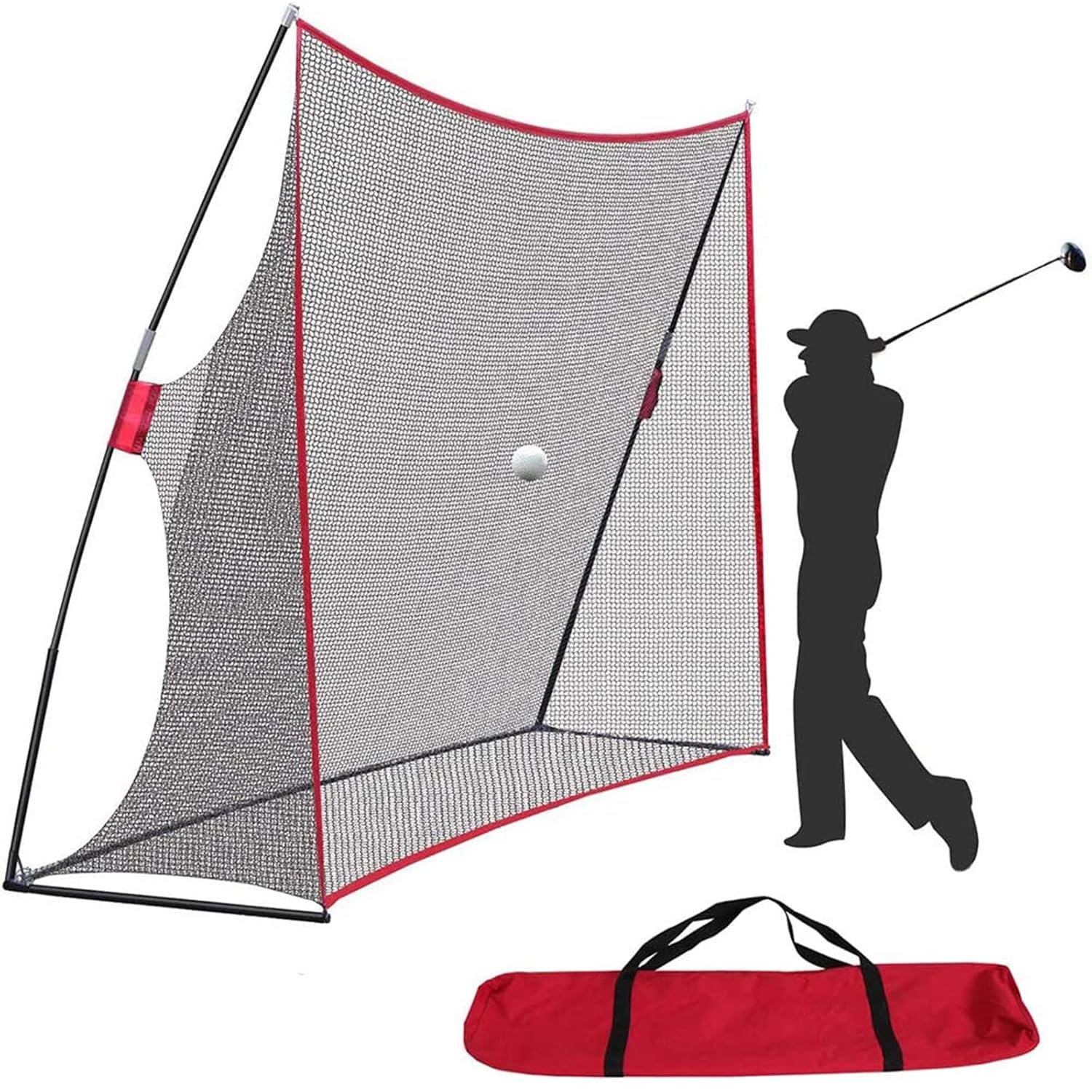
1. Golf Net 10x7ft: Best for Budget and Portability
Key Specs: 10 ft W × 7 ft H × 3 ft D | 7-ply knotless netting | Fiberglass pole frame | Weighs ~15 lbs | 4.6-star rating (1,238 reviews)
The Nova Golf Net is the entry point that actually makes sense for shared living. At $49.99, you’re spending less than dinner out, which means the permission conversation is basically nonexistent.
I tested this in a basement corner with limited overhead clearance. The fiberglass poles hold up well, and the 7-ply netting catches everything from a driver to a lob wedge without sending balls ricocheting into surrounding walls.
The automatic ball return design works well on flat concrete or tile. It angles back toward you naturally, so you spend more time hitting and less time retrieving balls from the corner. On carpet, the return isn’t as reliable, but that’s more of a surface issue than a design flaw.
Setup takes about 10 minutes the first time—just slot the poles together, unfold the net, and stake the base. After that, assembling it becomes a 5-minute job, and breaking it down for storage is equally quick.
What you’re trading away here is any real feedback beyond the feel of the swing. No launch data, no ball speed, no distance metrics, and absolutely no virtual course play. If you’re serious about getting numbers, this won’t deliver.
The noise level is genuinely quiet—just the ball hitting netting, no electronics or fans running. That’s a genuine advantage in an apartment where sound travels and timing matters.
Stray shots are essentially eliminated because the netting catches everything. You’re not going to accidentally send a ball through a wall or into your roommate’s room, which removes a major shared-space liability.
The portability is real. With the carrying case, you can move this between a basement, garage, or even a backyard in two trips. If you move apartments, it comes with you without debate or professional labor.
Space-wise, it takes up 10 feet of width and needs 3 feet of depth for the ball return, plus room to swing. That fits in most basements, spare rooms, or corners of larger spaces without dominating the area.
This works best if you’re serious about swing mechanics practice, not entertainment. If you want to play virtual rounds or track improvement with data, you’ll get frustrated quickly.
Who Wins This?
Pick this if you share costs with roommates—splitting $50 three ways is $17 per person, which is trivial. If budget is your primary concern or you’re testing whether you’ll actually use a simulator before investing more, this is the zero-risk entry point.
It’s also the choice if you have height constraints. The 7-foot height means it fits in basements where a full enclosure wouldn’t work, and it works indoors or outdoors, depending on where you have space.
2. Uneekor Eye MINI: Best for Flexibility and Real Data
Key Specs: Launch monitor only (no enclosure) | 19 precision metrics | 8-hour battery | Sunlight-readable display | Works with GSPro, E6, TGC 2019 | Requires i5 Gen12+ laptop for basic use | 5.0-star rating (3 reviews)
The Uneekor Eye MINI is the smartest middle-ground option for shared spaces because it doesn’t force you into a permanent setup. You’re buying just the launch monitor, not an entire enclosure system, which means you control the footprint and setup commitment.
I tested this indoors, paired with a small net in a basement corner, and also outdoors on a patio. The monitor itself weighs about 9 pounds and measures roughly 8 inches wide, compact enough that it fits on a shelf when not in use.
The outdoor capability is the real differentiator for shared living. With the 8-hour battery and sunlight-readable display, you can practice on a patio or driveway without needing a dedicated darkened room. That solves the space problem almost entirely if you have any outdoor access.
Setup is genuinely fast. You place the monitor on a flat surface about 5 to 6 feet from where you’ll stand, connect it to your phone or iPad via Wi-Fi, and you’re practicing within 5 minutes. No poles to assemble, no cables to run, no permanent installation.
The launch data is serious—ball speed, spin rate, launch angle, carry distance, and 16 other metrics get tracked and displayed in real time. You’re getting professional-level feedback, not guesses.
Software-wise, it comes bundled with VIEW (tracking and analytics), 3 months of GameDay 4K (20 courses), and Refine+ (swing analysis software). After those 3 months, you can play free practice mode or pay for subscription access to full course play.
Compatibility with external software like GSPro (which is free) means you can play unlimited virtual courses without a subscription if you’re willing to use the community-built options. That flexibility matters when budgets are shared.
The real limitation is that you still need a net or impact screen indoors to catch balls. The launch monitor doesn’t contain anything—it just measures ball flight. That means adding either the $50 practice net or pairing it with a proper impact screen, which costs more.
For a full simulation experience indoors, you also need a computer. The specs are reasonable (i5 Gen12 or better with 16GB RAM for basic play), but if your roommates don’t have a dedicated PC, that’s an additional cost or negotiation point.
On a patio, though, none of that matters. You’re hitting into open space, the monitor reads ball flight perfectly, and you get full virtual course play on an iPad. That’s essentially the entire advantage of this setup for shared living.
Accuracy is excellent. The high-speed cameras and infrared sensors measure spin from any golf ball accurately, so you’re not locked into specific branded balls or equipment. That flexibility actually saves money over time.
Noise is minimal, no fans, no alert sounds, just you and the ball. Indoors, the monitor operates silently; outdoors, it’s just the sound of the swing and impact.
The Real Cost of This Setup
At $4,500, this is significantly more expensive than the net, but it’s also dramatically cheaper than full-enclosure simulators at $12,000 and up. Splitting it two ways is $2,250 per person, which is reasonable for a serious shared hobby if both people golf.
If you’re the only golfer in your shared space, the cost conversation gets harder. You’re asking roommates to justify $4,500 of equipment taking up space they don’t use, which is a different negotiation than a $50 net.
Who Wins For?
Choose this if you want real launch data and virtual course play but can’t (or won’t) commit to a permanent enclosure. It’s ideal if you have outdoor space—even a small patio or driveway changes the entire equation by removing the indoor space constraint.
It works great if you can split the cost fairly with someone else who actually golfs. It also works if you have a decent PC and don’t mind using it for simulation when you want to play indoors.
3. Carl’s Golf Enclosure with 5-Foot Depth: Best for Committed Shared Spaces
Key Specs: 5 ft depth (shallow version) | Black nylon enclosure | Steel corner fittings | 6″ ball bungees | Requires EMT poles (source separately) | Requires impact screen (sold separately) | 4.7-star rating (9 reviews)
User Opinion About This Product
Carl’s enclosure kits are typically designed for dedicated spaces, but the 5-foot shallow version actually solves the shared-space problem when you prioritize something other than full swing play. This is the option for people who have a fixed space they can dedicate and want it to look and feel professional.
I evaluated this in a basement corner measuring roughly 9 feet wide by 6 feet tall. The 5-foot depth fits neatly without dominating the room or making the space feel completely taken over by golf equipment.
The kit itself includes the black nylon enclosure, steel corner fittings, ball bungees, and detailed assembly instructions. What you source separately are the 1-inch EMT (Electrical Metal Conduit) pipes from a hardware store, which cost roughly $150 to $250 depending on local pricing and how many lengths you need.
Assembly takes 4 to 6 hours if you’re handy with basic tools. If you’re not, that’s when it becomes a project you can do with a roommate—and that shared effort actually builds buy-in. People accept equipment they helped build better than equipment someone else installed.
The depth limitation is real. You’re not doing full driver swings here; you’re working with 3/4 swings or 9-hole play simulations. For some golfers, that’s a genuine limitation. For others, it’s acceptable because it saves space.
Ball containment is excellent. The black nylon walls surround the net, so stray shots don’t escape into the rest of your shared space. Every miss stays within the enclosure.
The impact screen itself isn’t included, so you’re adding that cost on top of the enclosure. Screen options range from basic to premium, but you’re looking at another $200 to $500 for a decent one when you factor in Carl’s pricing.
This setup pairs perfectly with a launch monitor like the Uneekor Eye MINI, which I tested inside the enclosure. The launch monitor sits just outside the impact screen, reads the ball flight through the screen transparently, and delivers full simulation data. Total footprint is still only 5 feet deep.
Disassembly is possible if you move, but it’s time-consuming. If your roommate situation is short-term or temporary, this is a riskier investment than the other options because extracting it later requires significant effort.
Noise is minimal once everything’s in place. The impact screen absorbs sound well, so you’re not creating disturbance for roommates during evening practice.
The Real Cost Structure
The enclosure kit is $1,300 plus EMT poles at roughly $150 to $250. If you pair it with the Uneekor Eye MINI ($4,500) and an impact screen ($200 to $500), you’re looking at $6,000 to $6,500 total. Split two ways, that’s $3,000 to $3,250 per person, which is substantial but significantly cheaper than premium simulators.
Split three ways with a roommate who wants to use it occasionally, the costs drop to $2,000 to $2,100 per person, which is more palatable for a shared hobby investment.
The Landlord Question
If you’re renting, check your lease carefully. The EMT frame isn’t bolted to walls or floor, so technically it shouldn’t damage the property, but landlords sometimes object to anything that looks like a permanent installation. Get written permission before buying the kit, this detail prevents expensive conflicts later.
Who Wins For
Choose this if you have a basement or a bonus room you can dedicate to golf. It’s best for people in long-term housing situations (owned homes or very stable rentals) who can commit to leaving the setup in place.
It also works well if you have at least one roommate or family member who actually wants to use it too. The shared cost and shared use justify the setup time and footprint commitment in ways that work only if multiple people benefit.
What to Avoid in Shared Spaces?
Full-size enclosures (10 feet deep) look amazing in a dedicated basement, but they’re a terrible choice for shared living. They take up half a room and make it impossible to use the space for anything else, which creates resentment fast.
Premium launch monitors like the GCQuad ($15,999) and TruGolf systems ($12,499) are industry leaders for professional and commercial use, but they’re not appropriate for shared spaces.
The cost alone means you’re asking roommates to fund your equipment, which rarely ends well. They also require more dedicated space and permanent installation, which shared spaces don’t support.
Don’t pair a high-end launch monitor with a cheap net and pretend it’ll work long-term. You’ll spend thousands on accurate data, then waste it by playing in an uncontained space where stray shots damage property or hurt people.
Making the Right Decision for Your Situation
Your path depends on three factors: available space, budget flexibility, and whether other people in your space actually want to golf. Think through each honestly.
Space Reality Check
Measure the depth available to you honestly. If it’s 5 feet or less, the net or a shallow enclosure is your realistic option. If it’s 8 to 10 feet, you have real flexibility with the launch monitor and enclosure combination.
If you only have outdoor access (patio or driveway) and no indoor option, the Uneekor Eye MINI alone is genuinely the best choice. Outdoor play with a launch monitor beats no simulator at all.
Budget and Buy-In
Talk honestly with roommates about the budget before you buy anything. $50 is a no-brainer; $4,500 needs discussion and agreement. Getting those conversations done up front prevents resentment and conflict later.
If you’re splitting costs fairly and people are willing, the more expensive options become more defensible. If you’re the only golfer and everyone else sees equipment as storage clutter, start with the net and prove the concept works before upgrading.
Commitment Level
Be realistic about how often you’ll actually use this. If you’re a casual golfer who hits balls once a month, a $50 net is the right answer. If you’re serious about practice or want to play virtual courses regularly, the investment in a launch monitor makes sense.
Most people start with the net, use it seriously for a month or two, then decide whether upgrading is worth it. That’s actually a smart path because it lowers your risk and gives you real data about your commitment before spending significantly more.

Frequently Asked Questions
Can I use a golf simulator in an apartment without bothering neighbors?
Yes, if you choose the right equipment and location. A practice net produces minimal noise and no stray balls, so apartment living is genuinely compatible if you pick tools designed for small spaces. Launch monitors and impact screens are also quiet—the issue is usually containing balls, not the equipment noise itself.
What’s the smallest space that works for a golf simulator?
A 5-foot-deep corner in a basement or bonus room works perfectly fine with a shallow enclosure or just a net and launch monitor. You won’t do full driver swings, but you’ll get realistic practice and data. For practice nets alone, even 3 feet of depth works if you’re not trying to hit hard.
Do I need to buy an impact screen to go with a launch monitor?
Indoors, yes—the launch monitor reads ball flight accurately through a screen, but you still need something to catch or stop the ball. Outdoors on a patio or range area, no—the monitor works perfectly without any containment because there’s nothing to damage.
Can roommates share the cost of a golf simulator fairly?
Absolutely, but only if they actually plan to use it. Splitting a $50 net three ways is trivial and doesn’t create conflict. Splitting a $4,500 launch monitor requires genuine agreement that everyone benefits. Be explicit about ownership, usage frequency, and what happens if someone moves.
Is a golf simulator worth it if I only have 5 feet of space?
Yes, if you’re realistic about limitations. You’re not hitting full drivers, but you get excellent practice with mid to long irons, realistic data, and virtual course play. Many golfers actually prefer the discipline of a shorter swing and tighter space.
What happens to a golf simulator if I move apartments?
Portable nets and launch monitors come with you easily. Enclosures can disassemble, but it’s labor-intensive. If your housing situation is temporary or unstable, prioritize portability—that’s the net or the launch monitor, not the frame-based enclosure.
Can I use a golf simulator outdoors year-round?
Partially. A launch monitor with an 8-hour battery works great outdoors in decent weather. Extreme heat, rain, or direct sunlight can affect performance or safety. A practice net works outdoors, too, but weather and temperature extremes still matter for the materials.
Do I need a powerful computer to use a launch monitor?
For basic practice and data tracking, no tablet or mid-range laptop works fine. For full simulation with graphics and online play, yes—you need at least an i5 Gen12 processor with RTX3060 graphics. Check specs before buying if you’re planning to use simulation software regularly.
What’s the real noise level of an indoor golf simulator?
Minimal. Nets are silent except for ball impact. Launch monitors have small fans that are barely audible. Impact screens absorb sound well. The noise you hear in shared spaces is usually from hitting the ball hard, not the equipment itself—which is actually something you control through swing intensity.
Can I rent a golf simulator to test it before buying?
Some local golf shops or simulator studios offer trial periods or temporary rentals, but it’s not common. Your best move is to start with the $50 net, use it seriously for a month, then make the bigger investment decision with real data about how often you’ll actually practice.
The Bottom Line
The best simulator for your shared space isn’t the fanciest one—it’s the one that fits your footprint, budget, and living situation. A $50 practice net is legitimately a fantastic starting point because it removes the risk, takes up minimal space, and gives you proof of concept before investing more.
If you have outdoor access and want real launch data, the Uneekor Eye MINI is the flexible middle option that works in apartments, patios, or any space where you can run a PC or iPad.
And if you’re committed to a permanent setup with shared buy-in, the shallow Carl’s enclosure becomes a realistic choice that actually feels professional without destroying your living space.
Start with what matches your constraints right now, use it honestly for a few weeks, and upgrade if you’re serious. That path is smarter than guessing and more expensive than buying equipment you won’t use.