
If you need to cancel a tee time you booked on GolfNow, the process depends on one thing: whether you booked while logged into a GolfPass+ Annual membership. I have helped many golfers sort this out, and the confusion usually comes from not knowing which of the two systems you are in. This article walks you through both paths so you can cancel quickly and avoid losing money.
How to Cancel a Tee Time on GolfNow? Step By Step
Check Your Eligibility First
Your ability to cancel online comes down to a single question: Are you an active GolfPass+ Annual member who booked while logged in? If yes, you can cancel any time up to one hour before your tee time and receive a GolfNow credit. If no, your cancellation is controlled by the golf course’s own policy, and you may not be able to cancel online at all.
Here is how to check your booking type:
- Logged-in booking: You see your reservation under “My Account” on GolfNow.com or in the app. You used your email and password when booking.
- Guest booking: You booked without logging in. You likely got a confirmation email, but have no account that shows the tee time.
- GolfPass+ status: Look under your account settings. If your membership is active, you will see “GolfPass+ Annual” and an expiration date.
If you are unsure, log in to GolfNow and check your upcoming reservations. If the tee time appears there, you are eligible for the member cancellation process. If it does not appear, you are a guest and need to contact the course directly.
The GolfPass+ Member Cancellation Process
If you are a GolfPass+ Annual member and booked while logged in, follow these steps. You can cancel through your browser or the mobile app. Both work the same way.
Cancel Using a Browser
- Go to GolfNow.com and log in to your account.
- Click your name in the top right corner and select “My Account.”
- Under “Upcoming Reservations,” find the tee time you want to cancel.
- Click the “Cancel” button next to that reservation.
- Confirm the cancellation when prompted.
- You will see a success message and receive a confirmation email.
Cancel Using the Mobile App
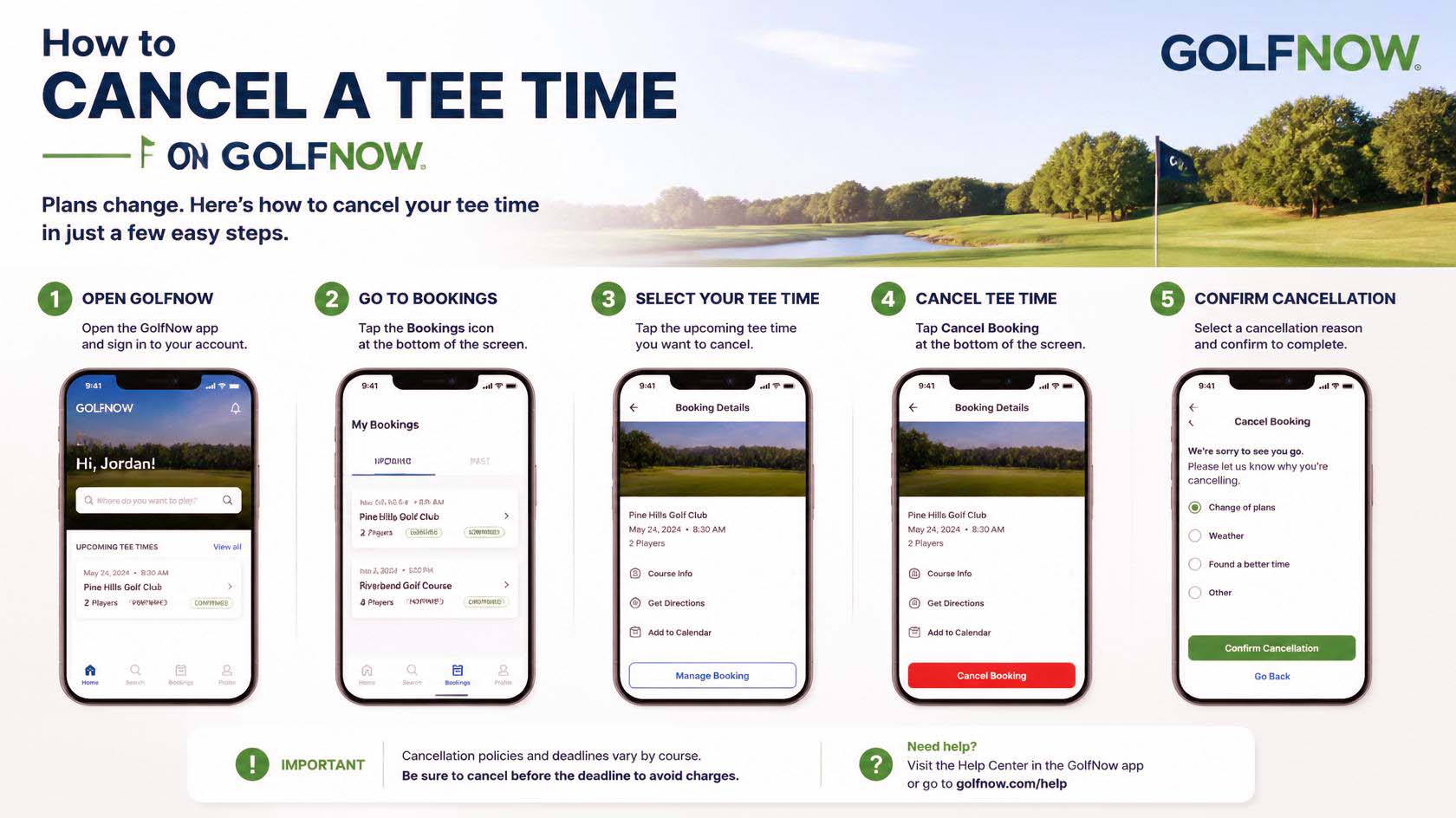
- Open the GolfNow app and log in.
- Tap the menu icon (three lines) and choose “My Reservations.”
- Select the tee time you need to cancel.
- Tap “Cancel Reservation.”
- Confirm the cancellation.
- Check for the confirmation email.
If the golf course is closed at the time you try to cancel, you may not see the cancel button. In that case, call GolfNow support directly. Do not wait because you could be charged as a no-show.
The Modification Alternative
Before you cancel, ask yourself: Do you really need to cancel, or can you modify the reservation? Many golfers cancel and then rebook the same tee time with a change, which wastes your credit and counts toward your yearly cancellation limit.
GolfPass+ members can modify a reservation one time per booking. This means you can change the number of golfers or the tee time in a single edit. You cannot change both the time and the group size in separate modifications on the same reservation.
How to Reduce the Number of Golfers?
If a few friends drop out but you still want to play, do not cancel everything. Instead, use the modify option to lower the player count. Here is how:
- Go to your reservation details in My Account or the app.
- Click or tap “Modify” (not “Cancel”).
- Adjust the number of golfers downward.
- Save the change. The unused spots will be released, and you keep the rest of the booking intact.
This saves you from using a cancellation slot and keeps your credit for future use. Remember: only one modification is allowed per reservation, so plan your changes carefully.
When can you not Cancel Online?
Not everyone can use the online cancellation feature. Here are the most common situations where you will need a different approach.
Guest Bookings
If you booked as a guest, your reservation is tied to the course’s own cancellation policy. GolfNow does not manage it. You must call or email the golf course directly to cancel. The course may have its own deadline and may charge a fee. Check your confirmation email for the course’s phone number or cancellation instructions.
Membership Timing Issues
If you booked a tee time before you became a GolfPass+ member, that booking does not qualify for Tee Time Protection. Also, if your membership lapsed between booking and the play date, you lose the cancellation benefit. Renew your membership first, then try to cancel. If that does not work, contact GolfNow support.
Abuse or Fraud Flags
GolfNow tracks cancellations. If you cancel more than twelve times in a membership year, you lose the ability to cancel online. GolfNow may also flag accounts that abuse the system, such as by repeatedly booking and cancelling. In these cases, you will need to call support to discuss your options.
What Happens After You Cancel
When you cancel a tee time as a GolfPass+ member, you get a GolfNow credit for the full amount you prepaid. Here is what you need to know about how credits work.
- Form: The credit is added to your GolfNow account, not your credit card. You cannot get a cash refund.
- Amount: You receive the full greens fees you paid, including any discounts or promotions used.
- Rewards: If you used a reward (like a free round from a referral), that reward is reactivated and can be used again.
- Expiration: Credits expire six months from the date they are issued. Check your expiration date in your account under “Payment Options.”
- How to use credits: When you book your next tee time, credits appear automatically during checkout as a payment option. Select them to reduce your total.
You will also receive a confirmation email after a successful cancellation. If you do not get one, your cancellation may not have gone through. Check your account to be sure.
Common Problem Scenarios
Even with the right process, things can go wrong. Here is how to handle the most frequent issues.
Cancelling Within One Hour of Play
If your tee time is less than one hour away, the online cancel button disappears. At this point, you risk being charged as a no-show. Your only option is to call GolfNow support immediately. If the course is closed, do not wait until it opens – call support right away. They may be able to help depending on the situation.
No-Show Consequences
If you do not cancel online and do not show up, the course charges a no-show fee. This fee is often the full price of the round. GolfNow will not refund a no-show, and it counts against your account. To avoid this, always cancel before the one-hour mark if you cannot play.
Weather or Course Closures
If the course closes due to weather or another reason, GolfNow handles it differently from a voluntary cancellation. You do not need to cancel manually. GolfNow will typically issue a full refund or credit automatically. Check your account after the scheduled tee time to see the credit. If nothing appears, contact support.
Frequently Asked Questions
Can I cancel a tee time I booked using GolfNow credits?
Yes. If you cancel a tee time that you paid for with GolfNow credits, those credits are returned to your account. They keep their original expiration date. The cancellation still counts toward your twelve-per-year limit.
What happens if I cancel a reservation with multiple tee times?
Cancelling a reservation that has multiple tee times (for a large group) cancels the entire block. You cannot cancel only one tee time within that group online. If you only want to remove part of the group, use the modification option instead to reduce the number of golfers.
Will the golf course be notified when I cancel online?
Yes. GolfNow sends an automatic notification to the course when a cancellation happens. You do not need to call the course separately if you are a GolfPass+ member and cancelled online.
Can I cancel a tee time booked through a GolfNow partner site?
It depends. Some golf courses use GolfNow as a booking engine but are listed on the course’s own website. If you booked through a partner integration, the cancellation policy is set by that partner. Contact the course or the partner site directly. The online cancellation steps above only apply to bookings made directly on GolfNow.com or the GolfNow app.
How do I know if my cancellation was successful?
After you cancel, you will see a green success banner on GolfNow.com or a confirmation screen in the app. You will also receive an email from GolfNow with the subject “Reservation Cancelled.” If you do not see the email within a few minutes, check your spam folder. You can also log into your account and verify that the reservation no longer appears under “Upcoming Reservations.”