

To use a slope rangefinder, activate slope mode using the dedicated button or switch, aim the device at your target, and press the measure button. The display will show the straight-line distance and an adjusted “plays-as” distance that accounts for uphill or downhill elevation. Use the adjusted distance to select the correct club, then turn slope mode off if you are playing in a competition where slope is not allowed.
What Is a Slope Rangefinder and How Does It Work?
A slope rangefinder is a laser distance-measuring device that calculates not only how far away your target is, but how elevation change affects the actual playing distance of the shot.
A standard rangefinder gives you a single number: the straight-line distance from where you stand to the target. A slope-enabled rangefinder goes further by measuring the angle between you and the target, then adjusting that distance to reflect how the ball will actually travel through the air.
That adjusted number is commonly called the “plays-as” distance, and it is the reason slope technology has become so popular in casual and practice rounds.
Why Elevation Changes the Real Distance of a Golf Shot?
Golf shots do not travel in straight lines parallel to the ground. Gravity, launch angle, and trajectory all matter.
- Uphill shots require more carry because the ball fights gravity longer
- Downhill shots need less carry because gravity assists the ball
For example, a flag that is 150 yards away on a steep downhill slope may actually play closer to 135–140 yards. Without slope data, many golfers instinctively over-club downhill shots and fly the green.
Slope rangefinders remove that guesswork by applying fundamental physics to your yardage.
How Slope Technology Calculates the “Plays-As” Distance?
Slope rangefinders use two measurements at the same time:
- Line-of-sight distance (laser-measured yardage)
- Vertical angle between you and the target
Using these two values, the device calculates the horizontal component of the shot, which is the distance that truly matters for carry.
While manufacturers use slightly different algorithms, the principle is consistent across brands:
Carry distance matters more than straight-line distance when elevation is involved.
This is why two golfers standing at the exact yardage but at different elevations can require completely different clubs.
Step-by-Step: How to use a rangefinder with slope?
Step 1: Activate Slope Mode
Most slope rangefinders include a button, switch, or mode selector. When slope mode is active, you will usually see:
- A slope icon
- A “plays-as” indicator
- Or a colored light (often green)
Always confirm slope mode is on before measuring.
Step 2: Aim at the Target
Hold the rangefinder steady with both hands if possible. Aim directly at the flagstick or your intended landing area.
Modern rangefinders use flag-lock or target-lock technology, which helps the laser prioritise the closest object (the flag) rather than trees behind it.
Step 3: Press the Measure Button
Once locked on, the device will display two distances:
- Actual distance (line-of-sight)
- Adjusted distance (plays-as yardage)
Some models display the angle as a positive (+) or negative (–) number.
Step 4: Choose Your Club Based on the Adjusted Distance
The adjusted number is the one you should primarily trust for club selection, assuming normal wind and lie conditions.
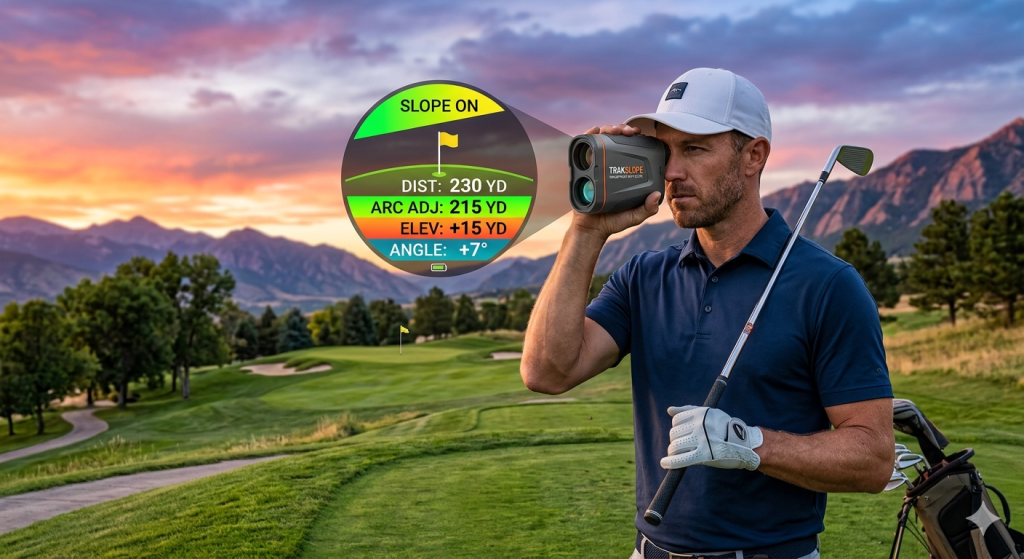
How to Read the Display: Distances, Angles, and Symbols?
Understanding what your rangefinder shows is just as important as knowing how to aim it.
- Top number: straight-line distance
- Bottom number: adjusted plays-as distance
- Positive angle (+): uphill shot, plays longer
- Negative angle (–): downhill shot, plays shorter
A reading of 165 yards with a “plays-as” of 175 means you should treat the shot like a 175-yard shot, not 165.
Choosing the Right Club Using Slope Data (Where Most Golfers Go Wrong)
Slope data is a tool, not a command.
Many golfers make the mistake of unquestioningly trusting the adjusted distance without considering:
- Wind direction and strength
- Ball lies (rough vs fairway)
- Green firmness and pin position
An innovative approach is to use slope to narrow your decision, then apply judgment. For example, if the hill says a shot plays 160 yards, but you are into a strong headwind, you may still need more club.
Good golfers blend slope data with experience rather than replacing feel entirely.
When You Should Not Rely on Slope Mode?
Slope rangefinders are not perfect in every situation.
Avoid relying heavily on slope for:
- Short wedge shots under 60 yards
- Punch shots or low-trajectory recovery shots
- Extreme wind conditions
- Shots where the landing spot matters more than the carry
In these cases, feel, trajectory control, and course management matter more than elevation math.
Is Slope Mode Legal in Tournament Play?
No, slope mode is not allowed in most official competitions.
According to USGA and R&A equipment rules, any distance-measuring device that calculates elevation-adjusted yardage must have that feature disabled during tournament play.
Most slope rangefinders are legal only if slope mode is turned off.
Many models include:
- A physical slope switch
- A tournament-legal indicator
- A visual confirmation that the slope is disabled
Failing to turn off the slope can result in penalties or disqualification.
Using a Slope Rangefinder for Practice vs Competitive Play
This is where slope truly shines.
In practice rounds, slope helps golfers:
- Learn how elevation affects distance
- Build better distance instincts
- Reduce reliance on guesswork
Over time, golfers who practice with slope develop a stronger internal sense of how uphill and downhill shots play — even when slope is turned off in competition.
Common Mistakes Golfers Make With Slope Rangefinders
- Forgetting slope mode is on during tournament rounds
- Targeting background objects instead of the flag
- Ignoring wind and lie because the slope “gave a Number”
- Over-clubbing uphill shots without considering the trajectory
Most problems come from misuse, not from the technology itself.
Slope Rangefinder vs GPS Apps: Which Is Better for Elevation?
GPS apps estimate elevation using pre-mapped course data. Slope rangefinders measure elevation in real time.
Key differences:
- GPS elevation can be outdated or smoothed
- Rangefinders account for your exact position
- GPS works better for layups and blind shots
- Rangefinders excel for precise approach shots
Many skilled golfers use both, depending on the situation.
Who Should Use a Slope Rangefinder?
Slope rangefinders are especially useful for:
- High handicappers are struggling with distance control
- Golfers playing hilly courses regularly
- Players focused on practice and improvement
Low handicappers and tournament players still benefit, but must learn when to rely on slope and when to switch it off.
Frequently Asked Questions
a) Does slope work on every golf course?
Yes, but its benefit is greater on courses with noticeable elevation change.
b) Is the hill accurate?
Modern slope rangefinders are highly accurate for distance and angle measurements, provided proper targeting.
c) Can slope replace knowing your yardages?
No. It enhances decision-making but does not replace distance control skills.
d) Is the slope proper on flat courses?
Its value is limited on flat terrain, but still helpful on raised greens and tees.
Final Thoughts: Is a Slope Rangefinder Worth Using?
A slope rangefinder isn’t just a distance tool—it’s a learning advantage. By revealing how elevation truly changes yardage, it helps golfers make smarter club choices, avoid costly over- or under-shots, and build long-term distance awareness. When blended with wind judgment, lie assessment, and experience, slope data sharpens decision-making without replacing feel.
Use it freely in practice to train your instincts, and responsibly in competition by switching it off. Mastered the right way, a slope rangefinder doesn’t complicate golf—it simplifies thoughtful shot planning and elevates confidence on every course.