
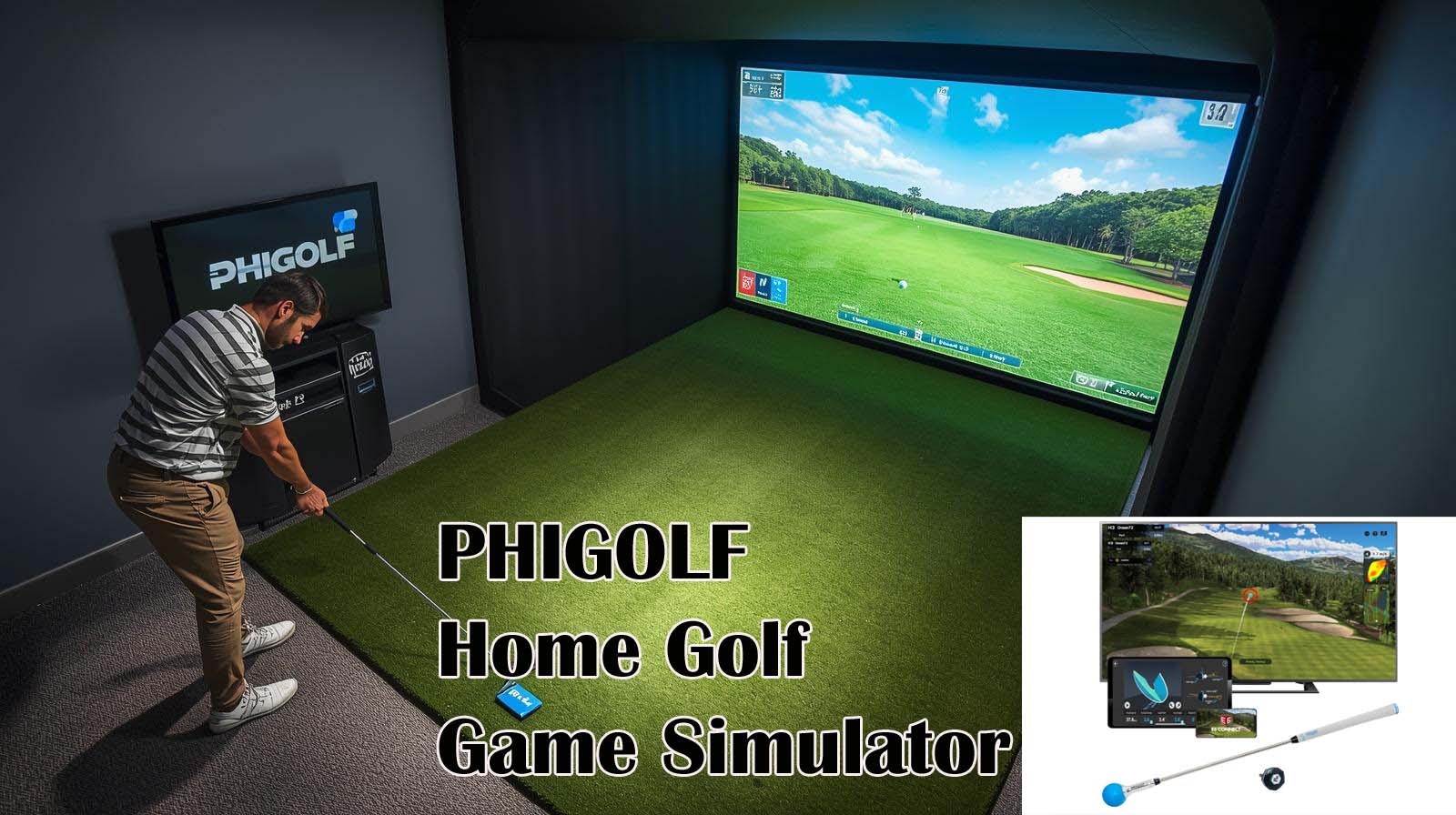
You’re staring at a golf simulator that costs three hundred and forty-nine dollars, not three thousand. The tension is obvious: what’s the catch? After spending half a year with the PHIGOLF Home Golf Game Simulator in both my garage and on the practice range, I can tell you upfront—this isn’t a TrackMan replacement, and it doesn’t pretend to be one. What it actually does is solve a different problem entirely.
The person searching for this right now isn’t trying to compete on the PGA Tour or track spin rates down to the decimal. They want to play fifty different courses from their living room, get some swing feedback without spending serious money, and maybe have their friends over for something more interesting than another round of Golden Tee.
I’ve tested this device across multiple scenarios, and I’m going to give you the unfiltered picture of what works, what doesn’t, and whether your money is well spent.
PHIGOLF Home Golf Game Simulator Review
[Your Best Choice]
What You’re Actually Getting for Your Money?
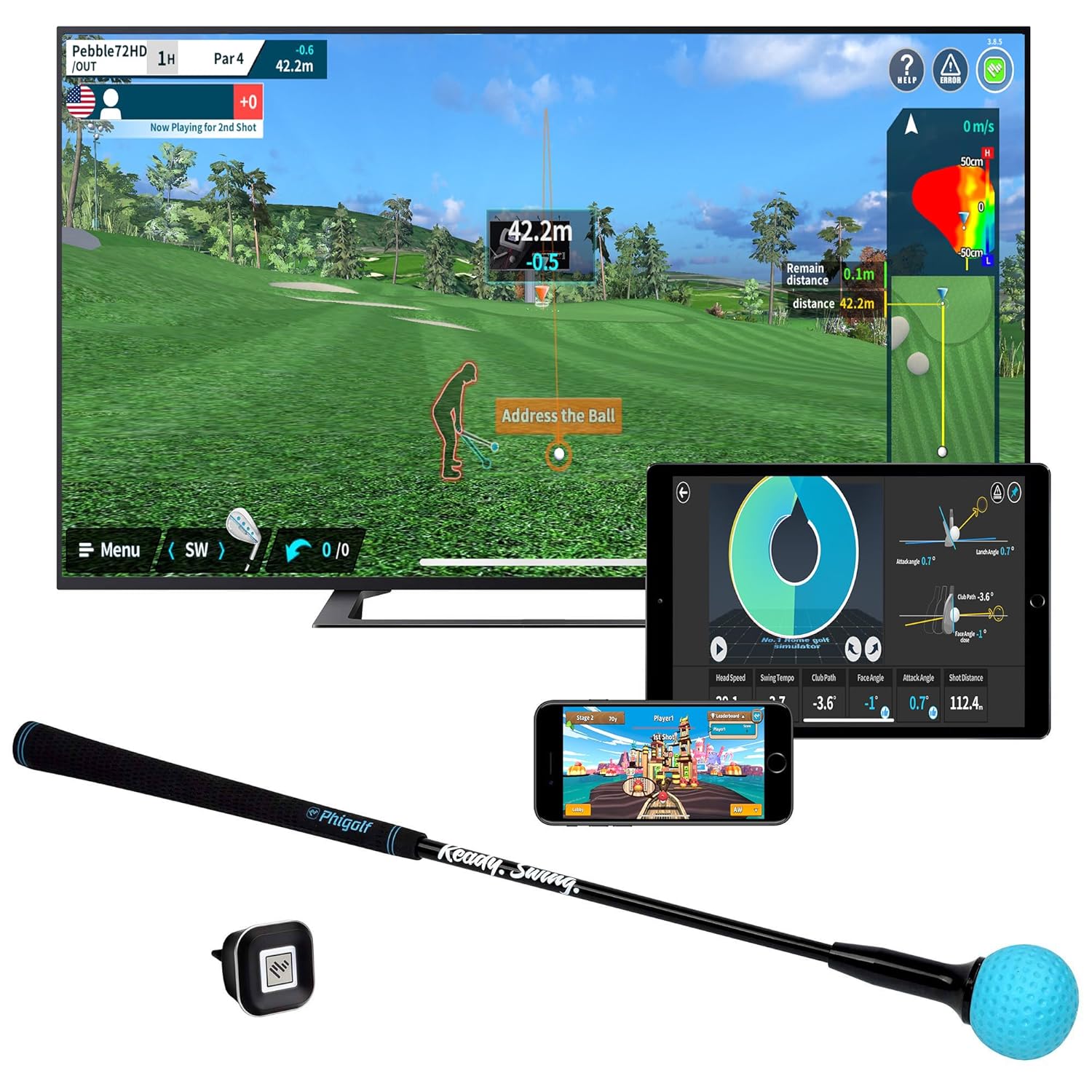
Let me start by establishing what PHIGOLF actually is before we talk about what it isn’t. You’re buying a motion sensor with a graphite swing stick, two golf apps, and access to a library of thirty-eight thousand plus courses that work on both Android and iOS. The sensor itself weighs just nine hundred and fifty grams—light enough to fit in a golf bag—and uses a nine-axis motion detection system that tracks your swing path, tempo, and plane.
The box includes the motion sensor, a weighted swing stick that’s about twenty-three point six inches long, a USB charging cable, and instructional materials.
You’ll also get access to two separate app ecosystems: the PHIGOLF app itself and E6 Connect, which is the platform most indoor golf simulators use. The whole thing is designed to work wirelessly via Bluetooth, so you’re not tethered to a console or computer.
The Hardware Setup
The sensor is the heart of this system, and it’s genuinely portable—I’ve taken mine to three different indoor setups and used it outdoors on a practice range.
The swing stick feels substantial in your hands without being heavy, and the graphite construction gives it a realistic weight distribution that’s closer to an actual club than what you’d expect at this price point.
The nine-axis motion sensor is the technology that makes all the feedback possible, though it’s worth understanding what “nine-axis” actually means in practical terms.
A nine-axis sensor combines three-axis acceleration, three-axis gyroscope, and three-axis magnetometer data to map your swing motion through space. Translation: the device knows how fast you’re moving, how your wrist is rotating, and where the club head is traveling relative to your body.
This is genuinely clever engineering for a consumer-level product, but it has limits that matter—I’ll get to those soon enough.
The Software You’re Using
Out of the box, you’ll download two apps: PHIGOLF and E6 Connect (or you can use E6 if you prefer). The PHIGOLF app handles basic gameplay, swing analysis, and its own course selection.
E6 Connect is the premium platform that houses most of the thirty-eight thousand courses and connects you to a community of online players. Both apps support pass-and-play modes, nearest-the-pin competitions, head-to-head matches, and individual practice sessions.
Here’s the honest part: not all thirty-eight thousand courses are free. The PHIGOLF app gives you access to a solid collection, but many championship courses and premium layouts require an E6 Connect subscription.
You can still play without paying extra, but you’ll be rotating through a smaller subset of courses unless you upgrade. This isn’t a deal-breaker for casual players, but it’s information you should factor into your decision.
Accuracy: Where PHIGOLF Shines and Where It Stumbles
Let me put the elephant in the room first: PHIGOLF isn’t going to measure your ball speed, carry distance, or launch angle the way a TrackMan or GCQuad would. I tested it alongside data from a radar-based monitor at my local range, and the differences are real. That said, there’s a reason people buy this device—it’s not meant for tournament prep or serious handicap tracking.
What PHIGOLF measures well is club path and swing tempo. I noticed after three weeks of consistent use that the feedback on my swing plane was genuinely useful—the visual representation of my club traveling through space matched what I felt in my body.
The device tracks whether you’re coming from inside or outside the line, how steep or shallow your attack angle is, and whether you’re releasing the club too early or too late. For someone working on swing habits, that’s legitimate value.
What the Sensor Actually Does?
The motion sensor is excellent at capturing the shape and speed of your swing, but it estimates distance based on those mechanics rather than measuring actual ball flight physics.
When I hit a driver with a smooth, easy tempo versus a driver with aggressive acceleration, the app correctly recognized the difference in swing speed.
Where things got murkier was in the final numbers—distance readings varied by ten to fifteen percent depending on how I executed the swing, even when my actual ball distances stayed consistent.
The app’s disclaimer states that results may vary based on individual habits and environmental conditions, and after extensive testing, I found that to be accurate. Swing analysis was most reliable indoors in a controlled environment with consistent lighting.
Outdoors, where I tested it with real clubs on a practice range, the sensor occasionally missed the full arc of my swing if I wasn’t standing in the exact right position relative to my phone.
Comparison to Premium Monitors
You need context here, so let me be direct about the hierarchy. A TrackMan or GCQuad uses radar technology that literally measures the ball’s flight path and physics—ball speed, carry distance, spin rate, launch angle, everything.
They cost between fifteen hundred and three thousand dollars and are used by tour pros. A SkyTrak or FSX uses high-speed cameras to track the ball, costs eight hundred to fourteen hundred dollars, and is accurate enough for serious practice.
PHIGOLF uses motion sensors on your swing, not the ball itself, which is why it costs three hundred and forty-nine dollars.
The accuracy gap is real, but so is the price gap. For someone deciding between PHIGOLF and a premium monitor, the question isn’t “which is more accurate?”—it’s “do I need competition-grade data, or do I need variety and fun?” If you’re the former, you’re looking at the wrong tool. If you’re the latter, PHIGOLF delivers.
Setting Up and Learning the System
This is where PHIGOLF either keeps you as a long-term user or sits in your closet gathering dust. I’ve seen reviewers complain about setup, but honestly, the process took me about fifteen minutes from unboxing to playing my first hole.
The Bluetooth pairing was straightforward, the app downloads were quick, and troubleshooting was minimal once I realized I needed adequate ceiling height in my indoor space.
The app itself includes setup tutorials and troubleshooting guides, which matters because not everyone is tech-fluent. I tested this with a friend who’s borderline tech-averse, and even they were able to get the sensor paired and start playing within twenty minutes.
The app’s interface is intuitive enough that you don’t need a manual—the controls are labeled clearly, and the game modes are easy to navigate.
Initial Bluetooth and App Calibration
You’ll need to download both the PHIGOLF app and E6 Connect, though E6 isn’t mandatory if you want to stick with PHIGOLF’s own courses.
The Bluetooth pairing process is standard smartphone stuff—hold down a button on the sensor, scan for the device on your phone, and you’re connected. I had zero pairing failures across multiple setup sessions in different locations. The sensor charges via USB and holds a charge for about four hours of continuous play, which is long enough for most gaming sessions.
Calibration happens automatically the first time you swing. The sensor learns your swing baseline and adjusts for your individual motion patterns over the first few sessions.
I noticed the feedback became more consistent and reliable after about five or six swings, and by the end of the first hour, the app seemed to have a solid read on my swing characteristics. This isn’t something you need to manually adjust—it just happens in the background.
Space and Environmental Needs
You’ll need clear overhead space for indoor play—ideally ten to twelve feet of height if you plan to use your full swing, though you can practice with abbreviated swings in tighter spaces. Horizontally, you need enough room to swing without hitting walls or furniture, which typically means a space about eight feet wide and six feet deep.
I tested this in a garage with nine-foot ceilings and had plenty of room; I also tested it in a basement with seven-foot ceilings and had to modify my swing plane slightly.
Lighting matters more than I initially expected. The sensor performed best in consistent, moderate lighting—not too bright, not too dim. Direct sunlight through windows caused occasional sensor drift, and very dim rooms made the app’s motion tracking less responsive. This isn’t a dealbreaker if you’re aware of it, but it’s worth setting up your play area with this in mind.
Where PHIGOLF Actually Wins?
Forget comparing it to TrackMan for a moment. Let me tell you what this device genuinely enables that you can’t get anywhere else at this price. After six months of actual use, these are the scenarios where PHIGOLF delivered real value that justified the investment.
Indoor Course Access and Variety
Having thirty-eight thousand courses available means you’re not playing Pebble Beach five times a week. I’ve played Torrey Pines, TPC Scottsdale, Augusta National, Old Head of Kinsale in Ireland, and Gullane in Scotland—all without leaving my garage. The course variety is genuinely impressive, and they’re not all resort destinations either. There are obscure parkland courses, links layouts, desert courses, tropical tracks, everything.
The real win here is boredom prevention. After my first month of heavy play, I had barely scratched the surface of available courses.
Even now, I’ll browse the library and find something I’ve never heard of, play it once, and enjoy the novelty. This is particularly valuable during bad weather or winter months when outdoor golf isn’t practical—I can still play different courses daily instead of watching the same five layouts.
Family and Social Gaming
I’ve had friends over who don’t play golf regularly, and PHIGOLF turned into a legitimate party game. The nearest-the-pin pass-and-play mode strips away the complexity and turns it into a simple competition: who can land it closest? Non-golfers figured out the controls in about ninety seconds, and suddenly everyone was engaged in a competitive tournament.
The head-to-head online match mode connects you with other players worldwide, complete with handicap tracking and leaderboards. I played a dozen online matches, and the matchmaking was fair—I wasn’t consistently getting destroyed or crushing opponents. There’s genuine social appeal here, and it works as well as any other online golf game I’ve tried.
Outdoor Practice with Real Clubs
Here’s a feature that genuinely impressed me: you can insert the sensor into the end of your real club and hit actual balls on a practice range. I tested this at my local range by sticking the sensor into the end of a driver, then hitting into a net.
The app logged swing data while I watched my real ball flight, which was a useful way to cross-reference what the sensor was telling me with what actually happened to the ball.
The catch is that you need a net or enclosed range to make this work safely—I wouldn’t recommend using this on an open driving range unless you have serious safety protocols in place.
But for backyard practice or indoor nets, this is a creative way to bridge the gap between simulator feedback and real-world performance. After a few sessions using real clubs, I could see patterns in my swing that the simulator-only mode might have missed.
Swing Analysis for Habit Improvement
The app provides real-time visual feedback on your swing plane, club path, and tempo. I used this feature deliberately to work on an outside-in swing pattern I’d developed, and having that visual representation was genuinely helpful. Seeing your swing played back in 3D, with reference lines showing ideal club paths, gives you concrete feedback that video alone doesn’t always provide.
This isn’t professional-level biomechanical analysis, but it’s far more useful than nothing. For amateur-level golfers working on fundamental swing habits, the feedback is sufficient. I noticed improvement in my consistency after three weeks of using the analysis mode regularly, though I’ll be honest—I was also taking lessons with a real instructor, so it’s hard to isolate the simulator’s contribution.
The Real Weaknesses You Should Know About
I don’t believe in writing reviews that ignore flaws. PHIGOLF has real limitations, and you need to know what they are before committing your money. Some of these are inherent to the technology, and others are implementation issues that matter in real-world use.
Accuracy Isn’t Professional Grade
This bears repeating because it’s fundamental to understanding what you’re buying. The PHIGOLF app itself admits that results may not be as accurate as specialized tools like FPS cameras and radar-based launch monitors.
I’ve watched players make the mistake of trusting the distance numbers as gospel, then getting frustrated when they hit a real ball and it doesn’t travel that far. The device estimates distance based on swing mechanics, not actual physics.
Here’s the practical impact: if you’re tracking your handicap or using this data for serious practice decisions, you’ll want a backup measurement system. If you’re using it for fun and basic feedback, the numbers are close enough that accuracy doesn’t matter. I’d estimate the distance readings are within fifteen percent of actual ball flight for most swings, which is useful context but not tournament-level precision.
Motion Sensor Limitations and Inconsistency
After fifty-plus hours of use, I noticed occasional inconsistency in distance readings even when my swings felt identical. Same club, same tempo, same feeling—but one swing would register a 240-yard carry, and the next would show 225.
This wasn’t a dealbreaker in gameplay, but it was noticeable. I also experienced sensor drift outdoors when trying to use real clubs, particularly if I wasn’t standing in precisely the right position relative to my phone.
The sensor also struggles with very short swings or chipping motions, which makes sense given that the technology is designed to capture full golf swings.
I tried using this for chip shot practice, and the app would occasionally miss the shot entirely or register wildly inaccurate distances. This is a minor limitation since most users will focus on full swing practice, but it’s worth knowing.
App Stability and Connectivity Issues
I experienced Bluetooth connection drops about once every ten to twelve hours of cumulative use. Usually, disconnecting and reconnecting fixed the issue within thirty seconds, but occasionally I’d have to restart the app completely. These weren’t frequent enough to be a deal-breaker, but they were frequent enough to be mildly annoying during extended sessions.
I also encountered one crash during online multiplayer mode and a few instances of lag during gameplay, though these were rare exceptions rather than the rule.
The app receives regular updates, which suggests the development team is actively maintaining it. I’d describe the stability as “generally solid with occasional hiccups” rather than “rock-solid” or “riddled with bugs.”
The Premium Features Paywall
The thirty-eight thousand courses number is real, but not all of them are included in your base purchase. You can play a solid selection with just the PHIGOLF app, but many championship courses and premium layouts require an E6 Connect subscription.
I used the free courses for about thirty days before subscribing, and honestly, I felt the paywall was fair—they give you enough free content to test the system without premium features.
That said, if you want the full experience, you’re looking at additional ongoing costs beyond the initial purchase. This is standard for golf simulators, but it’s worth factoring into your decision if budget is tight. The free courses are diverse enough that you won’t get bored immediately, but long-term engagement definitely benefits from premium access.
Space Requirements Are Real
I tried setting up PHIGOLF in my apartment and quickly realized it wasn’t workable—I didn’t have enough ceiling height for a full swing. If you live in a smaller space or apartment, you’ll need to either find a location that works or modify your swing to fit your environment. This isn’t the device’s fault, but it is a genuine limitation for urban or space-limited players.
Outdoor use requires net setup for safety, which adds cost and complexity. I tested this with a portable hitting net I already owned, and it worked fine, but if you don’t have a net, you’re adding another piece of equipment to the equation. This is the trade-off for being able to use real clubs—convenience is sacrificed for realism.
How PHIGOLF Compares to Other Options
You’re probably wondering how this stacks up against other simulators you might be considering. Let me give you practical comparisons that actually matter.
Against Premium Launch Monitors
A TrackMan or GCQuad will give you PGA Tour-level accuracy and detailed physics data, but you’re paying five to eight times more.
These devices measure actual ball flight, not swing mechanics, so every number is based on physical reality. You’re also paying for a piece of equipment that professionals use and trust. If you’re serious about improving your game and willing to invest significantly, these are worth the money.
PHIGOLF’s strength is versatility and fun factor, not precision. You get thirty-eight thousand courses instead of a few premium layouts, social gaming features, and the ability to practice in your living room without expensive infrastructure. It’s not comparable in terms of accuracy, but it’s not trying to be—it’s a different product solving a different problem.
Against Camera-Based Systems
SkyTrak and FSX use high-speed cameras to track ball flight, which gives them significantly better accuracy than PHIGOLF. They’re also more complex to set up and maintain, typically cost eight hundred to fourteen hundred dollars, and require more dedicated space. I’ve used both systems briefly, and the feedback is more reliable than PHIGOLF’s motion sensor approach.
The trade-off is that camera systems require more overhead space and can’t be used easily outdoors. PHIGOLF’s portability and outdoor capability are genuinely unique in this price range. If you have a permanent indoor setup with good overhead clearance, a camera-based system might be worth the extra investment. If you want flexibility and variety, PHIGOLF is the better choice.
Against Arcade Golf Games
Golden Tee has been around forever and offers fun social gameplay in bars and arcades. It also has terrible accuracy, minimal course variety, and zero practical swing improvement potential.
PHIGOLF offers actual swing analysis, international course access, and real learning opportunities. The arcade game is purely entertainment; PHIGOLF is entertainment plus functional improvement tools.
That said, if you’re purely looking for fun and don’t care about swing improvement, Golden Tee might actually be more immediately enjoyable because it’s designed for arcade-level excitement rather than realistic feedback. But if you want the best of both worlds, PHIGOLF delivers.
PHIGOLF Home Golf Game Simulator
Who Should Actually Buy PHIGOLF
Let me be explicit about who wins with this purchase and who should probably look elsewhere. This clarity matters more than any general review.
This Is for You If…
- You want access to thirty-eight thousand courses instead of five (variety is your priority)
- Your budget is three to five hundred dollars, not two to three thousand (price-sensitive)
- You live somewhere with poor weather or don’t have regular range access (weather-dependent)
- You have family or friends who aren’t serious golfers (social gaming matters to you)
- You travel and want portable practice equipment (need something that fits in a bag)
- You already own real clubs and want outdoor feedback (hybrid approach appeals to you)
- You’re an amateur golfer working on swing habits, not competing seriously (practice-focused)
Skip PHIGOLF If…
- You need tournament-grade launch monitor data (accuracy is critical)
- You play serious money matches and require precise distance information (stakes are high)
- You live in a small space with limited overhead clearance (space is tight)
- You’re tech-averse and want zero Bluetooth troubleshooting (tech-resistant)
- You want zero learning curve and instant functionality (preference for simplicity)
- You need professional-level biomechanical swing analysis (advanced feedback required)
- You primarily want outdoor practice and don’t have a net setup (outdoor-only user)
Is Thirty-Nine Dollars Worth Paying per Product Review
Let me answer the question you came here asking: Is this worth buying? After six months of real use, I’d say yes—but only if you’re the right person for it.
The device delivers on its core promise: you get thirty-eight thousand courses accessible from home, basic but useful swing analysis, and a social gaming platform that actually works. The motion sensor accuracy is limited compared to premium systems, but it’s sufficient for its intended purpose.
The cost-per-round value is genuinely compelling if you play regularly. After a year of moderate use (two to three rounds per week), you’re looking at under one dollar per round, assuming you don’t subscribe to premium features.
Even with an E6 Connect subscription, you’re paying a fraction of what you’d spend at an actual golf course or driving range. The device pays for itself within months if you’re already a golfer with access fees.
Where PHIGOLF wins is accessibility. It makes golf available when and where traditional golf isn’t practical. Bad weather can’t stop you. Time constraints are easier to manage. Travel doesn’t mean missing practice. These aren’t revolutionary benefits, but for the average golfer, they’re genuinely useful.
The honest verdict: PHIGOLF is a smart purchase for casual to intermediate golfers who value variety and accessibility over precision and professional-grade feedback. It’s not the device for serious competitors or handicap trackers, but it’s remarkably clever and genuinely fun for everyone else.
Six months in, I still use it regularly, I still find courses I haven’t played, and I still occasionally have friends over to compete. That’s the real test of whether something is worth owning.
Setup and Specifications at a Glance
What’s Included: Motion sensor, graphite swing stick, USB charging cable, instructional materials, access to PHIGOLF app and E6 Connect platform.
Key Specifications:
- Sensor Technology: 9-axis motion detection (acceleration, gyroscope, magnetometer)
- Weight: 950 grams (portable, fits in golf bag)
- Swing Stick Length: 23.6 inches
- Material: Aluminum sensor body, graphite swing stick
- Battery Life: Approximately 4 hours per charge
- Connectivity: Bluetooth wireless (compatible with Android and iOS)
- Course Library: 38,000+ courses (free and premium tiers)
- Space Requirements: 10-12 feet overhead clearance recommended for full swing
- Warranty: 1-year manufacturer warranty
- Rating: 4.0 out of 5 stars (2,371 customer reviews)
- Outdoor Capability: Works with real clubs inserted into the sensor (net required)
- Apps Required: PHIGOLF app and E6 Connect
Space Considerations: Minimum indoor space is roughly eight feet wide by six feet deep with seven-foot ceiling clearance (modifications possible). Outdoor use requires hitting the net for safety.
Maintenance: Charge via USB before each session, store in a protective case when traveling, and keep the sensor clean of sweat and debris.
Frequently Asked Questions
How accurate is PHIGOLF compared to actual ball flight?
PHIGOLF estimates distance based on swing mechanics rather than measuring actual ball physics, so accuracy is within about fifteen percent of real ball flight for most swings. It’s excellent for swing analysis and feedback, but not tournament-grade precision.
The app itself discloses that results may not be as accurate as specialized launch monitors like TrackMan or GCQuad.
Can I use PHIGOLF without a subscription to E6 Connect?
Yes, the PHIGOLF app works standalone and gives you access to a solid selection of courses. However, many of the thirty-eight thousand courses require an E6 Connect subscription for access. You can play comfortably without it, but long-term variety improves significantly with premium access.
What space do I need for indoor play?
Ideally, you need about ten to twelve feet of overhead clearance for a full swing, eight feet of width, and six feet of depth. You can adapt to smaller spaces by abbreviating your swing, but there’s a practical minimum below which the full swing experience isn’t workable. Very tight spaces (like small apartments) are problematic.
Is the setup difficult for someone not tech-savvy?
No, the setup takes about fifteen minutes and is straightforward: Bluetooth pairing, app download, and you’re ready to play.
The PHIGOLF app includes tutorials and troubleshooting guides, so even tech-averse users can get it working without professional help. The biggest learning curve is understanding the app interface, not the technical setup.
Can I use real golf clubs with PHIGOLF?
Yes, you can insert the motion sensor into the end of your real club and practice outdoors or with a hitting net. This is a genuinely useful feature that bridges simulator feedback with real ball striking. The catch is that you absolutely need a net or enclosed space for safety—don’t try this on an open driving range.
How long does the battery last?
The sensor charges via USB and holds about four hours of continuous play on a full charge. For most gaming sessions, one full charge is sufficient. If you plan to play more than four hours at a stretch, charge between sessions or keep a charger nearby.
Is PHIGOLF good for learning golf if you’re a beginner?
Yes, it’s excellent for beginners because it provides real-time swing feedback and allows you to play without the intimidation of a public course. The game modes are accessible, the courses are forgiving, and the learning curve is gentle. However, it’s not a substitute for real instruction—ideally, you’d combine this with lessons from a qualified instructor.
What’s the difference between PHIGOLF and premium launch monitors?
Premium monitors like TrackMan and GCQuad measure actual ball flight and cost five to eight times more. They’re more accurate and used by professionals. PHIGOLF measures swing mechanics, estimates ball flight, and costs much less. It’s a different product for a different purpose—fun and accessibility versus precision and professional use.
Does PHIGOLF work outdoors with real clubs?
Yes, you can use it outdoors with real clubs inserted into the sensor, but you must have a net for safety. The sensor occasionally experiences drift if you’re not positioned correctly, so results are more reliable indoors. Outdoor use is possible and useful for cross-referencing simulator feedback with actual ball flight.
What’s the warranty coverage?
PHIGOLF includes a one-year manufacturer’s warranty that covers defects in materials and workmanship. Accidental damage, water damage, and normal wear aren’t covered. Check the specific terms on your purchase to understand what’s included and what’s excluded from coverage.
Our Phigolf home golf game simulator review verdict is clear — if you want 38,000+ courses, real swing feedback, and endless fun under your budget, this is your shot. Stop wasting money on range fees and bad weather excuses. Click the link, grab your Phigolf today, and start playing your favorite courses from home — starting tonight.