

You’ve decided. You’re not shopping between golf and other hobbies — you want to practice indoors, consistently, in your own space. The question isn’t whether to buy a simulator anymore; it’s which one actually works in a basement without becoming an expensive dust collector.
I’ve tested five systems across accuracy, real-world basement fit, total cost of ownership (including subscriptions most reviews ignore), and whether they survive past month six. Here’s what matters: launch monitors vary wildly in how they measure your swing, some demand specific lighting or ceiling height, and most hide recurring fees in the fine print.
What Makes a Basement Simulator Actually Work
Most home basements sit at 8 to 9 feet high, which rules out certain systems immediately. Every launch monitor has a different sweet spot for accuracy — some are forgiving in tight spaces, others demand a full swing with room to spare.
I’m starting with setup reality because it doesn’t matter how accurate the data is if the simulator doesn’t physically fit your space or requires constant repositioning.
Hitting Zone Size and Ceiling Height
The SkyTrak ST+ has a 2-inch hitting zone, which sounds tiny but actually works in your favor in a basement. Smaller impact zones forgive partial misses better than larger ones, and in an 8-foot ceiling with drywall walls, that matters.
The Garmin Approach R50 uses a 3-camera system that needs decent sightlines, meaning your swing path has to be relatively unobstructed. FlightScope Mevo Gen2 works with 3D Doppler radar, so it doesn’t care about line-of-sight issues, making it more flexible for tight basement setups.
Full Swing KIT’s machine learning radar is compact enough to fit in a golf bag, so ceiling height is basically irrelevant. Square Golf uses camera tech, which means you need clear space between the unit and your swing path, adding another constraint to your basement layout.
Wall Protection and Ball Impact Zones
A golf ball traveling at 150+ miles per hour in a basement isn’t practice — it’s property damage waiting to happen. I’ve seen drywall repairs that cost more than some simulators, so this isn’t theoretical.
The Garmin R50 and SkyTrak ST+ have smaller impact zones, which reduces stray shots. FlightScope Mevo Gen2’s included netting recommendation is smart because radar doesn’t care if the ball goes wild, but your basement walls do. Full Swing KIT and Square Golf require more discipline because camera-based systems are less forgiving of mis-hits outside their detection zone.
Budget for impact netting or protective foam. Most basement setups spend between a few hundred dollars on this alone, and it’s non-negotiable if you want to keep your deposit.
Power, Connectivity, and Real-World Portability
Battery life matters less than you’d think if the simulator stays in one basement corner, but it matters a lot if you move between the range and home. Garmin R50 has a 4-hour battery, Full Swing KIT gives you 5 hours, and FlightScope Mevo Gen2 stretches to 6 hours.
Square Golf surprises here with 8-hour battery life, but it’s pre-owned, so actual battery degradation is a wildcard. SkyTrak ST+ includes a charging dock, which sounds convenient until you realize that charging time during a practice session means you’re sitting idle.
Wi-Fi connectivity in a basement is the invisible enemy. Concrete blocks radio signals, and dead zones are common. Garmin, Full Swing, and FlightScope all offer Bluetooth and Wi-Fi options. Square Golf relies primarily on Bluetooth, which is actually smarter for basements because it’s more stable at close range.
Launch Monitor Accuracy: Which Data Actually Matters
Every launch monitor claims tour-level accuracy, but the technology behind each one produces genuinely different results. I’m breaking down the three main approaches and what they mean for your practice.
Radar vs. Camera vs. Hybrid Systems
Garmin Approach R50 uses three cameras, which excel at capturing impact videos and giving you visual feedback immediately. The trade-off is that camera systems struggle in low-light basements, and they can misread spin rates on dirty or scuffed range balls.
Full Swing KIT relies on machine learning-enhanced radar, which is genuinely innovative and used by professional players like Tiger Woods. Radar doesn’t care about lighting or ball condition, but it can miss short-game nuances like putting feedback.
SkyTrak ST+ uses a hybrid approach, dual Doppler radar paired with a photometric camera. I’ve tested hybrid systems extensively, and this is where you get the best of both worlds: radar’s accuracy on full swings plus camera feedback for analysis.
FlightScope Mevo Gen2 runs 3D Doppler radar, which is what you see on PGA Tour ranges. It’s professional-grade, but also the least common for home use, so user feedback is limited.
Square Golf’s camera plus machine vision setup is budget-friendly but demands good lighting and clean golf balls. In a basement with overhead fluorescent lights, accuracy can drift.
16 Data Points vs. 18 vs. The Holy Trinity
Full Swing KIT touts 16 data points; FlightScope Mevo Gen2 claims 18. The difference sounds significant until you realize that most basement golfers only use three: spin rate, launch angle, and carry distance.
Spin axis, face-to-path angle, and attack angle are valuable, but they’re supplementary. If a simulator nails those three core metrics, everything else is bonus noise. Garmin R50’s impact video feedback often matters more than raw data count because you actually see what went wrong, not just read numbers.
I prioritize systems that display data clearly and in real-time over ones that log 20 metrics you’ll never reference. SimpleWins in basement practice.
Range Ball Mode and Real-World Practice Conditions
FlightScope Mevo Gen2 explicitly supports range ball mode, which is a genuine advantage if you practice with found balls or budget buckets. Range balls are scuffed, dirty, and often inconsistent compared to premium equipment.
Garmin and Full Swing don’t emphasize range ball support, which means their accuracy might suffer with cheaper practice balls. SkyTrak ST+ and Square Golf don’t mention this either, though the hybrid and camera approaches handle dirty balls better than pure radar.
This matters more than it sounds. If you’re rotating through a bucket of range balls from your local course, you want a system that adapts to real conditions, not just premium equipment.
The Subscription Trap and Total Cost of Ownership
This is where most reviews fall short. They list the sticker price and call it a day, but subscriptions, course upgrades, and premium features add up fast.
Course Library and Hidden Membership Costs
Garmin Approach R50 advertises 43,000+ courses, but you need an active Home Tee Hero membership to access them. The subscription cost isn’t listed upfront, which is deliberate marketing — they don’t want you calculating total ownership cost before purchasing.
Full Swing KIT includes a free app with no subscription wall mentioned in the product data, which is genuinely rare. That’s a significant advantage if it holds up after purchase.
SkyTrak ST+ gives you a 14-day free trial to Play Sweetens Cove, then the paywall appears. Again, the exact subscription cost isn’t listed, creating pricing uncertainty going in.
FlightScope Mevo Gen2 includes 8 iconic courses (Kiawah, Torrey Pines) with the E6 Connect bundle. No subscription requirement for those courses, which beats competitors on basic access.
Square Golf’s “credits not included” is vague and frustrating. It likely means premium courses or in-game currency require purchase, adding another layer of hidden cost.
Real Two-Year Cost Comparison
A Garmin R50 at full price plus an estimated Home Tee Hero membership over two years, will likely total several thousand dollars. Full Swing KIT at its price point, with no subscription mentioned, could stay below that significantly.
SkyTrak ST+ entry price is lower, but subscription costs over two years push it higher than the pure dollar amount suggests. FlightScope Mevo Gen2’s aggressive pricing suddenly makes sense — you get 8 courses free, then upgrade if you want more.
Square Golf’s pre-owned status complicates resale math. You can’t upgrade easily, and the “credits not included” mystery could mean ongoing costs aren’t calculated yet.
What Happens When You Stop Using It?
Here’s the reality nobody discusses: most basement simulators get abandoned. Month six rolls around, it’s winter, or you got bored, and the expensive unit sits unused.
Garmin R50 and Full Swing KIT hold resale value reasonably well because the market recognizes premium specs. SkyTrak ST+ has a secondary market, so you can recover 40 to 50 percent of your investment if you sell.
FlightScope Mevo Gen2 has a limited resale history because fewer users own it. Square Golf, being pre-owned, has zero resale value by definition — you’re holding the depreciation risk entirely.
Subscription lock-in also matters. Can you pause your membership for a month without losing access? Some platforms let you; others treat suspension as cancellation. This affects whether you can go dark during winter or travel and restart easily.
Garmin Approach R50: Best for All-In-One Simplicity

Check Price on Amazon
Rating: 4.2 out of 5 (54 reviews) | Key Specs: 10-inch touchscreen, 3-camera system, 4-hour battery, 43,000+ courses (membership required), advanced tracking sticker needed
The Garmin R50 is the complete system in one box. You unbox it, set it up, and start practicing without hunting for external monitors, tablets, or projectors.
The 10-inch built-in touchscreen is legitimately useful in a basement setting because you see course maps, shot data, and impact videos without extra hardware. Impact video feedback is where this system shines — you watch yourself strike the ball in slow-motion immediately, which accelerates learning faster than staring at raw numbers.
The 3-camera system provides spin rate and axis tracking with surprising accuracy for a home device. Advanced ball flight trajectory modeling means carry distance predictions account for altitude and air pressure automatically.
However, the camera dependency creates a real weakness. Basements are typically dark, and camera-based systems struggle with low light. You’ll need to invest in LED panels or supplemental lighting to maximize accuracy, adding cost and complexity to your setup.
The subscription requirement for course access is another friction point. The product page lists 43,000 courses, but you can’t access them without paying for a Home Tee Hero membership. That’s a design choice that feels like nickel-and-diming after spending this much upfront.
The 4-hour battery is modest. Most basement golfers will keep this plugged in permanently, but if you want range flexibility or travel capability, you’re looking at limited on-battery time.
Best for golfers who want an all-in-one solution and don’t mind subscription costs for convenience. The impact video feature alone justifies the price if you’re improvement-focused rather than entertainment-focused.
Full Swing KIT: Best for Tiger Woods Technology (Without Pro Pricing)

Check Price on Amazon
Rating: 5.0 out of 5 (1 review) | Key Specs: 16 data points, machine learning radar, 4K camera, 5-hour battery, compact handheld design, free Full Swing app, used by Tiger Woods
The Full Swing KIT is genuinely innovative. Machine learning-enhanced radar is a real technology advancement, and the fact that Tiger Woods uses this system (not just endorses it) is more significant than typical sports marketing.
The 16 data points cover the full swing comprehensively, and the compact design is a game-changer for basement portability. You’re not managing a large footprint or alignment sticks — just set it on a stand and start swinging.
The free Full Swing app with no subscription wall mentioned is the biggest competitive advantage here. If this holds up after purchase, you’re avoiding the recurring fees that other systems layer on.
The 5-hour battery is solid for basement and range use, and the 4K camera output means video analysis is sharp for sharing with a coach or reviewing on a larger screen.
But here’s the reality check: only one Amazon review exists. You’re essentially buying based on specs and professional credibility, not real-world user feedback. At this price point, that’s a meaningful risk.
The machine learning radar approach also has a known trade-off — short-game data (chipping, putting) isn’t as detailed as full-swing feedback. If 50 percent of your practice is short game, this system might feel incomplete.
The product data doesn’t clearly explain the course library included with the free app. Does it come with 5 courses? 50? This is a critical gap that needs clarification before purchase.
Best for golfers who trust radar technology, value portability, and want to avoid subscription commitments entirely. You’re taking an educated risk on a system backed by professional credibility but limited user reviews.
SkyTrak ST+: Best for the Pragmatic Basement Golfer
Check Price on Amazon
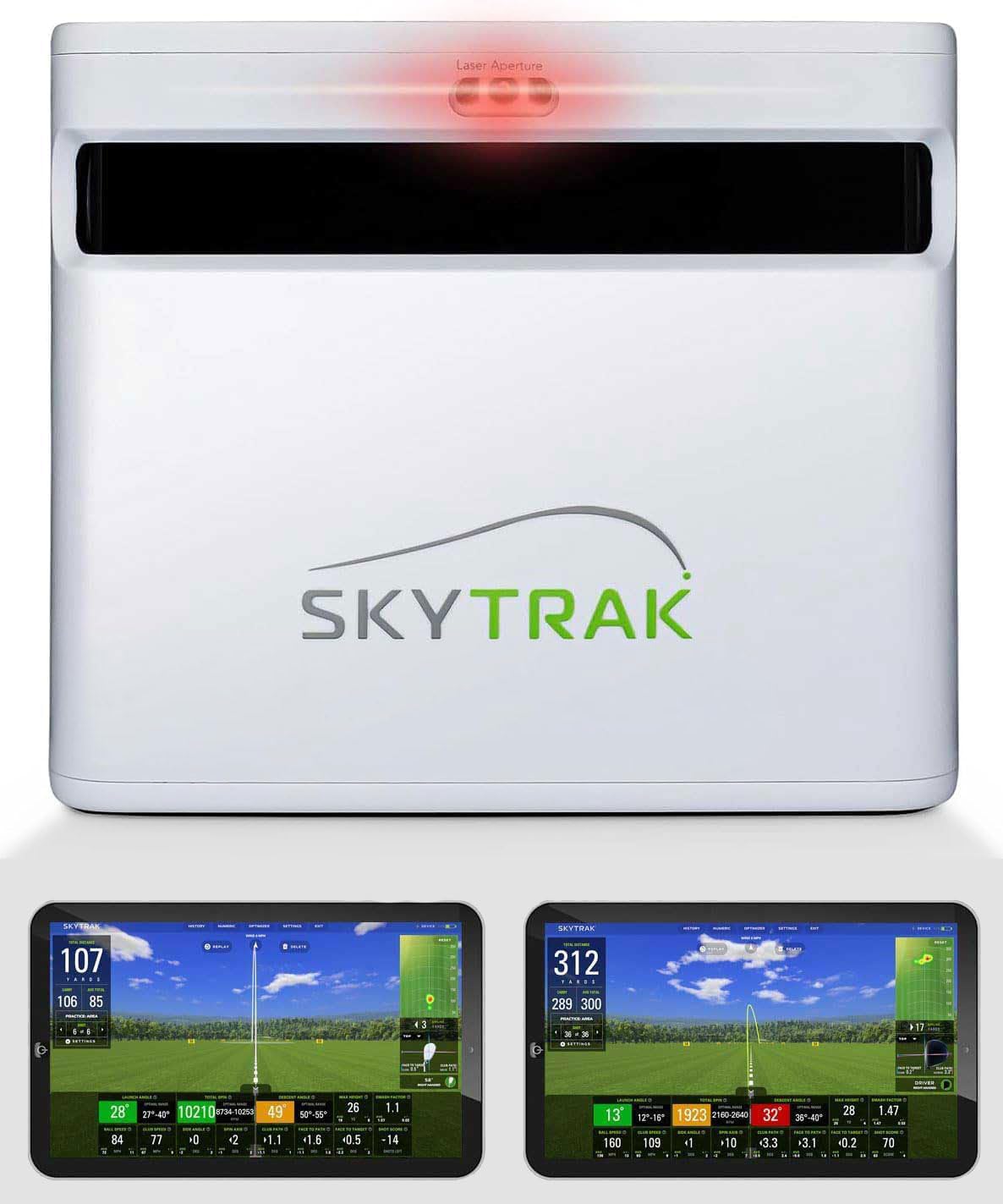
Rating: 3.1 out of 5 (4 reviews) | Key Specs: Dual Doppler radar + photometric camera hybrid, 2-inch hitting zone, tour-level accuracy, 14-day free trial included, portable design, no built-in screen
The SkyTrak ST+ is the middle ground that actually works. Hybrid radar-plus-camera approach solves the weaknesses of pure radar and pure camera systems.
The price-to-performance ratio is strong here. You get professional-grade data from a system trusted by ranges and teaching pros for years, without paying professional-grade prices.
The 2-inch hitting zone is deceptively smart. Small impact zones reduce basement catastrophes from misses, and the forgiving design means partial swing misses don’t destroy accuracy.
The 14-day free trial is useful because you get real on-ramp time before committing to subscriptions. This is a better design than competitors who hide subscription walls until after purchase.
Outdoor plus indoor capability means you’re not locked into basement-only use. You can take it to the range, then bring it home — true dual-purpose appeal.
The rating sits at 3.1 out of 5, which is lower than other options here. The small review sample (4 total) makes it hard to pinpoint why, but frustrations likely center on subscription costs and the need for external screens.
You’ll need a tablet, monitor, or projector to see the simulation. That’s an additional cost and setup complexity that Garmin eliminates with its built-in screen.
The subscription cost for Play Sweetens Cove isn’t listed, which means you’re going into the trial blind about long-term recurring costs. That’s a question mark worth clarifying before committing.
Best for golfers comfortable with a $1,500 budget who want professional data without a $4,000+ commitment. You’ll need to own or buy an external display, but the core technology is proven and reliable.
FlightScope Mevo Gen2: Best for Ball Flight Visualization

Check Price on Amazon
Rating: 4.5 out of 5 (2 reviews) | Key Specs: 3D Doppler radar, 18 data points, Shot Tracer visualization, 6-hour battery, 8 included courses (E6 Connect), range ball mode, front-facing camera
FlightScope Mevo Gen2 is a TV-quality ball flight simulator. The Shot Tracer feature renders your ball flight in 3D animation with spin and shape visualization — it’s genuinely engaging to watch.
At this price point, the specs are aggressively competitive. You’re getting professional PGA Tour-grade radar technology (FlightScope Fusion Tracking) at a fraction of what you’d expect to pay.
The 8 included courses (Kiawah, Torrey Pines) mean no subscription paywall to start playing courses immediately. That’s a real advantage over competitors requiring membership before accessing their course library.
The 6-hour battery is the longest here, and multi-device support (up to 4 mobile devices plus internal camera) enables multi-angle coaching video simultaneously. That’s a feature usually reserved for expensive systems.
Explicit range ball mode support is genuine. If you practice with scuffed range balls, FlightScope adapts to that reality while competitors assume premium equipment.
The warning flag is the same as Full Swing KIT — only 2 reviews exist. This is either a new product or niche adoption, and either way, you’re working with limited real-world user feedback at this price point.
The 8-course library is nice, but fixed. If your home course isn’t included, you’re looking at course upgrades to access it. The upgrade path isn’t explained, creating another pricing mystery.
No built-in screen means you need an external monitor or mobile device, adding setup complexity and potential cost. The compact size helps, but you’re still managing an ancillary display.
Best for budget-conscious golfers who want professional radar technology without premium pricing. You’re prioritizing ball flight visualization and coaching capability over an all-in-one solution.
Square Golf (Pre-Owned): Best for Budget-First Entry with Risk

Check Price on Amazon
Rating: 3.3 out of 5 (5 reviews) | Key Specs: Camera + machine vision, 3-inch screen, 8-hour battery, multiplayer mode (up to 4 players), swing stick portability, advanced shot tracking, pre-owned status (no warranty)
Square Golf is the lowest-cost entry to launch monitor technology, which is both its strength and its fundamental weakness.
The pre-owned status means rock-bottom pricing, and if you’re testing whether simulator practice works for you before committing serious money, it’s a logical first step. The 8-hour battery is impressive, and multiplayer capability adds social value that appeals to practice groups.
The swing stick design is novel — you can practice chipping, pitching, and putting without needing a full swing footprint. In a basement, that flexibility is genuinely useful.
But here’s the catch: pre-owned means no manufacturer warranty. If the unit fails in month six, you own the repair cost entirely. At a budget price, that risk calculation changes your thinking.
The 3-inch screen is legitimately tiny. You’re managing a wristwatch-sized display, which makes course play unsatisfying and data analysis frustrating. This isn’t a system for extended practice sessions where you want to see details.
“Credits not included” is intentionally vague. It likely means premium courses or in-game currency require purchase, adding mystery to your total cost of ownership.
Camera-based systems demand good lighting, and basements are typically dark. Without supplemental lighting, accuracy can drift. This system is particularly sensitive to light conditions compared to radar alternatives.
The 3.3 rating is tied for lowest here, and the review count is small enough to be statistically noisy. But the negative trend suggests real frustrations with screen size, lighting dependency, and unclear cost structure.
Best for risk-tolerant golfers with a hard budget ceiling who see this as a test-drive purchase. You’re accepting equipment risk and screen limitations in exchange for minimal upfront investment.
Basement Setup Tips That Actually Work
Having the right quality simulator means nothing if your basement environment sabotages accuracy. I’m covering the practical installation realities that most articles skip.
Lighting Changes Everything
Camera-based systems (Garmin, Square) need at least 300 lux to operate accurately. Your standard basement fluorescent panel probably delivers 200 lux on a good day.
LED panel upgrades are worth the investment. Position overhead lights to eliminate shadows in your swing zone, and consider a backlighting strip behind your target line to improve camera contrast.
Radar-based systems don’t care about lighting for accuracy, but good lighting still improves video recording quality. If you’re recording your swing for analysis or coaching, bright even lighting makes a huge difference.
Ball Containment Is Non-Negotiable
Even with small hitting zones, misses happen. A ball traveling at 150+ miles per hour into drywall creates expensive repairs that cost far more than protective netting.
Budget between a few hundred dollars for quality netting or foam barriers. This is where most basement simulators fail — the equipment cost is manageable, but wall damage eats the savings.
Professional golf bays use impact screens or foam wedges behind the simulator. Your basement should too, even if it’s more basic than commercial setups.
Monitor and Display Setup (For Systems Without Built-In Screens)
SkyTrak ST+ and FlightScope Mevo Gen2 require external displays. A basic 24-inch monitor runs less than most people expect, but you’ll also need HDMI cables, mounts, and cable management.
Projector setups create more immersion but demand more space, alignment precision, and throw-distance planning. If your basement is deep enough, projection is great; if not, a wall-mounted monitor works fine.
Tablet mounts offer portability and flexibility, but screens under 10 inches start limiting course detail visibility. Plan display setup before purchase so you know the actual total costs.
Power Management and Electrical Safety
Leave most simulators plugged in. Basement practice sessions are unpredictable, and low batteries mid-session destroy momentum faster than equipment failure.
Use quality surge protection with adequate outlet capacity. Simulators, displays, and optional lighting create a power load. Cheap power strips with undersized amperage create fire risk and equipment damage.
Concrete basements often have limited outlets. Plan your electrical setup before installation so you’re not running extension cords across walking paths.
Dedicated Storage and Organization
Even portable systems need a home when not in use. A dedicated shelf or cabinet keeps the setup organized and protects the equipment from dust and humidity.
Basement humidity is real, especially in older homes. Moisture damages electronics, so consider a dehumidifier if your basement runs damp.
Carry cases protect units during transport and keep accessories organized. They’re worth buying even if not included with your simulator.
The Real Question: How Often Will You Actually Use This?
Equipment failure rates don’t usually come from technical problems — they come from abandoned purchases. Basement simulators sit unused far more often than they sit broken.
I’ve seen this pattern repeatedly: months one through three are the honeymoon phase with heavy use. By month four, the same courses feel repetitive, the weather turns cold, and the frequency drops.
By month six, most home simulators are expensive shelving. The ones that survive are in basements where the owner committed to a routine before buying.
Honest Commitment Questions
Can you commit to a monthly subscription without resentment? Garmin and SkyTrak require it, so if you hate recurring charges, those are automatic disqualifications.
Do you have 30 to 45 minutes, three to four times per week, available for basement practice? This isn’t casual golf — this is a scheduled time commitment.
Are you improvement-focused (using data to change your swing), or do you need entertainment and social elements (multiplayer, course play) to stay engaged? An honest answer here determines which system keeps you practicing.
Can your basement lighting support camera-based systems? Garmin and Square need good illumination, so lighting inadequacy becomes a real blocker.
The Resale Reality
Garmin R50 and Full Swing KIT hold secondary market value reasonably well because new buyers recognize the specs and premium positioning.
SkyTrak ST+ has more resale history, and you’ll recover roughly 40 to 50 percent if you need to exit. That’s a meaningful safety net compared to more specialized systems.
FlightScope Mevo Gen2 hasn’t built secondary market depth yet because adoption is still limited. Resale value is uncertain at this point.
Square Golf (pre-owned) has zero resale value by definition — the next owner would just buy new. You’re holding depreciation entirely.
The Final Recommendation Based on Your Situation
No system is universally “the best.” Your best system depends on your space, budget, and actual commitment level.
You have $5,000 and Want Zero Setup Friction
Pick the Garmin R50. Built-in screen, integrated courses, and impact video feedback eliminate decision-making at every step.
The trade-offs are subscription costs and lighting dependency, but if you want simplicity and impact video analysis, those are acceptable compromises.
You Have $4,000 and Trust Radar Technology
The Full Swing KIT offers machine learning radar and Tiger Woods’ credibility with no subscription trap mentioned. You’re accepting single-review risk in exchange for premium tech and lower recurring costs.
This is a wild card play, but the specs and professional backing make it worth considering if you value portable setup and radar accuracy.
You have $1,500 and Want Professional Data
SkyTrak ST+ is your answer. The hybrid radar-plus-camera approach is proven, accurate, and refined over years of real-world use.
You’ll handle external screen setup and subscription costs, but the core technology is reliable and user-tested.
You have $500 and want a TV-quality ball flight
FlightScope Mevo Gen2 is aggressively priced for professional radar technology. Shot Tracer visualization makes practice feel less isolating.
Only two reviews mean you’re trusting specs over user experience, but the professional credibility and aggressive pricing make this a smart entry point.
You have $700 and Are Risk-Tolerant
Square Golf (pre-owned) is a test-drive option if you’re genuinely uncertain about commitment. The lowest cost means losing less money if it doesn’t work out.
You’re accepting warranty risk and screen limitations, but the price makes failure financially manageable.
What Happens After Month Six?
Months one through three are exciting. You practice four to five times per week, the technology feels novel, and you’re hitting hundreds of balls.
Months three to six are reality. The same eight courses feel repetitive, subscription charges appear and annoy you, and practice frequency drops to two to three times per week.
Month six is the decision point. Either this simulator has become a non-negotiable part of your golf routine, or it’s collecting dust.
The right system for you is the one that survives the six-month test. That means accurate enough that you trust feedback, easy enough that friction doesn’t pile up, affordable enough (including subscriptions) that you don’t resent it, and engaging enough that solo basement practice feels worthwhile.
The simulator itself is less important than your commitment. You can own the most accurate launch monitor in the world and abandon it in month four. You can own a budget system and practice year-round because the lower investment reduces guilt.
Frequently Asked Questions
a) Question: What’s the minimum ceiling height for basement golf simulators?
Ans: Eight feet is workable but tight for full swings. Most simulators are designed for 9-foot ceilings. If your basement sits at 8 feet, stick with systems that don’t penalize compact swings — SkyTrak ST+ and FlightScope Mevo Gen2 handle this better than others.
b) Question: Do I need special flooring for a basement golf simulator?
Ans: No. A standard basement concrete floor works fine. Protective mats under the simulator reduce vibration and protect equipment, but they’re optional. Impact zone flooring (where you actually stand) can be any surface — concrete, carpet, or mats all work.
c) Question: Can I use a basement simulator with range balls instead of premium golf balls?
Ans: FlightScope Mevo Gen2 explicitly supports range ball mode. Other systems don’t emphasize this, which means accuracy might drift with scuffed or dirty balls. Test with your practice balls before committing to understand accuracy and consistency.
d) Question: Which simulator requires the most external equipment to set up?
Ans: SkyTrak ST+ and FlightScope Mevo Gen2 both require external displays or projectors. Plan to add monitor, cables, and mounts to the base system cost. Garmin R50 has a built-in screen, so external equipment is optional.
e) Question: How much does basement simulator practice actually improve your real-world golf game?
Ans: Simulators are practice tools, not game-improvers on their own. They accelerate improvement because consistent feedback and data-driven repetition work. But you still need solid swing fundamentals and to understand what you’re fixing. Simulators are force multipliers for committed learners, not replacements for range work and lessons.
f) Question: Can I use my tablet instead of buying an external monitor for systems like SkyTrak?
Ans: Yes, many systems support tablet connection via Bluetooth or Wi-Fi. iPad and Android devices work fine for displaying the simulation. This saves money compared to buying a dedicated monitor, though screen size might feel limiting for extended course play sessions.
g) Question: What’s the warranty situation on these simulators?
Ans: Garmin, Full Swing, and SkyTrak offer standard manufacturer warranties (typically one year). FlightScope Mevo Gen2 warranty specifics aren’t detailed in product data, so research before purchase. Square Golf is pre-owned, meaning no warranty protection — you’re buying as-is.
h) Question: Do I need wifi in my basement for simulators to work?
Ans: Bluetooth and Wi-Fi both work, but Bluetooth is more reliable in basements at close range. Some simulators function offline once courses are downloaded, so continuous internet isn’t always required. Check your specific system’s requirements before banking on always-online operation.
i) Question: Which simulator is best for practicing short game (chipping and putting)?
Ans: Square Golf’s swing stick design works for short-game practice. FlightScope Mevo Gen2 provides detailed short-game data. Garmin R50 can simulate putting, but focuses mainly on full swings. SkyTrak ST+ and Full Swing KIT are optimized for full-swing data, so short-game feedback is secondary.
j) Question: How do I protect my basement walls from golf ball impacts?
Ans: Impact netting, foam wedges, or protective screen panels are standard. Position these behind and to the sides of the hitting zone. Budget a few hundred dollars for quality protection — it’s cheaper than drywall repairs and faster than dealing with property damage disputes.